
Reducing User Confusion in a Dual-System Experience
Chicago Tool Library (Website + Member Portal)
Project Overview
Project Type
Chicago Tool Library UX Evaluation & IA Redesign
Problem
Users struggled to understand borrowing and navigation between systems
Role
UX Researcher & Designer
Methods
Heuristic analysis, survey synthesis, IA audit, wireframing
Outcome
Proposed unified navigation + clearer borrowing flow
Problem
Chicago Tool Library provides access to tools for community members, but the experience is split across a public-facing website and a separate member portal.
Through initial exploration, it became clear that users—especially first-time visitors—may struggle to understand:
what a tool library is
how borrowing works
whether membership is required
where to go to complete key actions
This lack of clarity is compounded by inconsistencies between the website and portal, which creates a fragmented experience and increases cognitive load when navigating between systems.
Insights were informed by a broader needs assessment conducted with the organization. (View full document)
User Pain Points
Users must navigate between the public site and borrowing portal to complete core tasks, resulting in a fragmented and disjointed experience.
No seamless flow from discovery → borrowing
Users don’t know where they are or where to go next
Increased cognitive load
Approach
To better understand the experience, I focused on identifying usability breakdowns and gaps in the information architecture.
Heuristic Evaluation
I conducted a heuristic review of both the website and the member portal to identify usability issues related to navigation, clarity, and consistency.
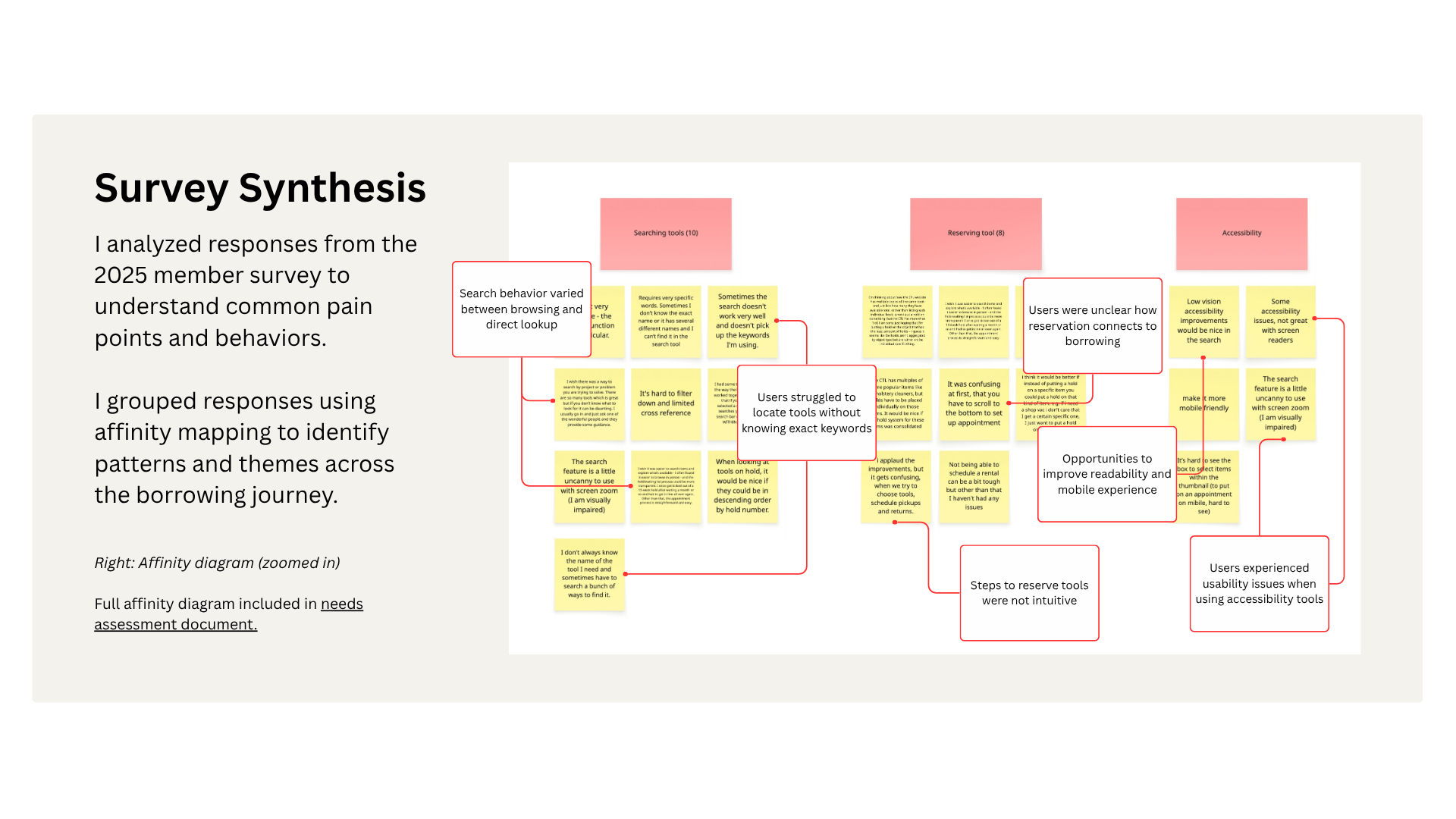
Survey Synthesis
I analyzed responses from the 2025 member survey to understand common pain points and areas of confusion.
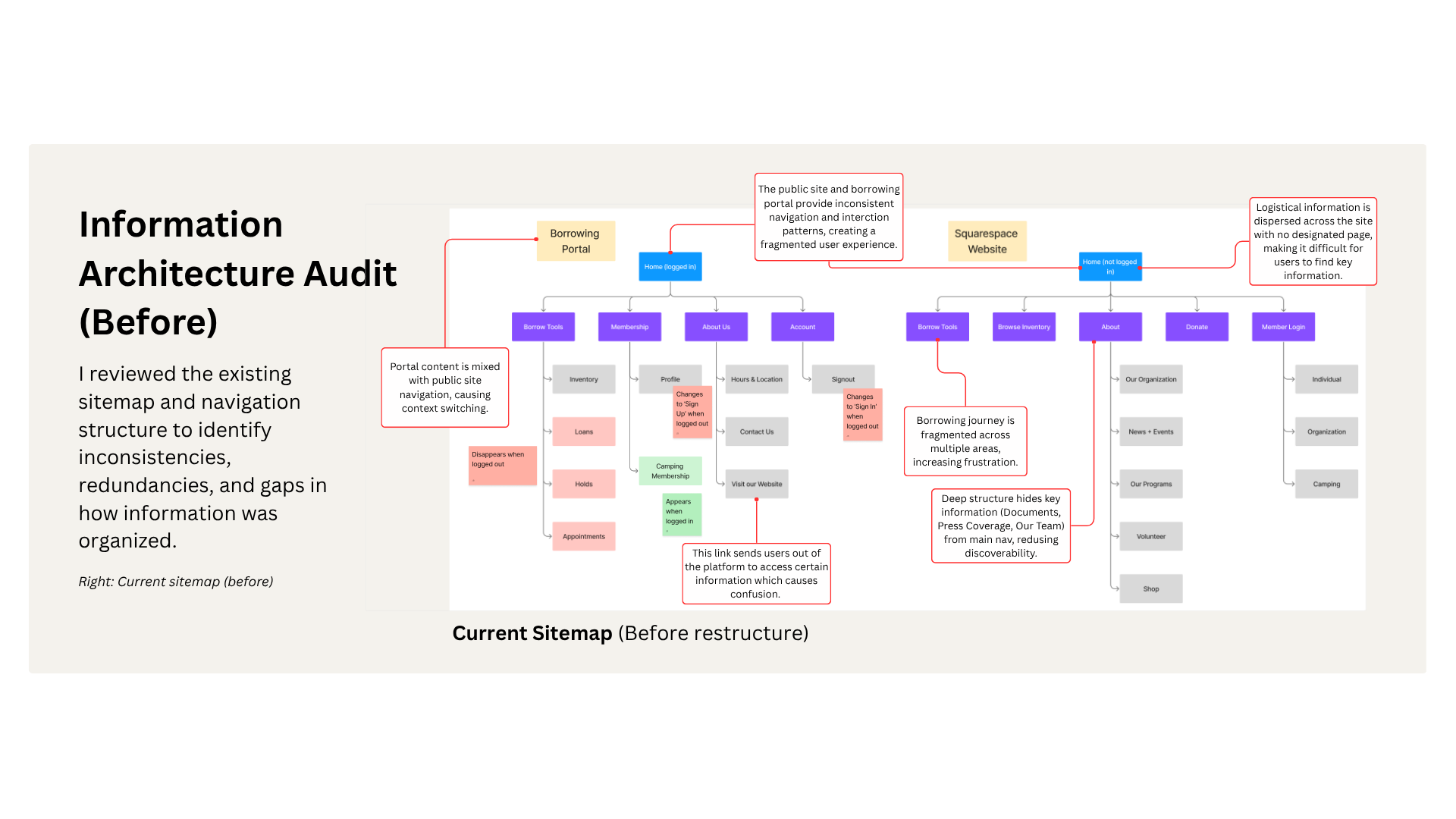
Information Architecture Audit
I reviewed the existing sitemap and navigation structure to identify inconsistencies, redundancies, and gaps in how information was organized.
Why this approach?
Given limited access to users and development resources, I prioritized lightweight methods that allowed for efficient identification of usability issues while still grounding decisions in real user feedback.
Key Insights
Findings from the heuristic analysis and survey synthesis were consolidated into a master findings list to identify recurring patterns and prioritize issues. This helped surface high-impact issues related to navigation, terminology, and task flow.
Navigation is inconsistent across the website and member portal, forcing users to relearn structure and creating disorientation
Users struggle to understand how borrowing works, including membership requirements and the steps involved
Terminology (e.g., “Loans,” “Holds,” “C-Tools”) does not match user mental models, increasing confusion
Key actions (borrowing, scheduling, managing tools) are fragmented across pages instead of being grouped by user intent
Dense text, poor hierarchy, and lack of visual structure increase cognitive load and reduce scannability
Design Decisions
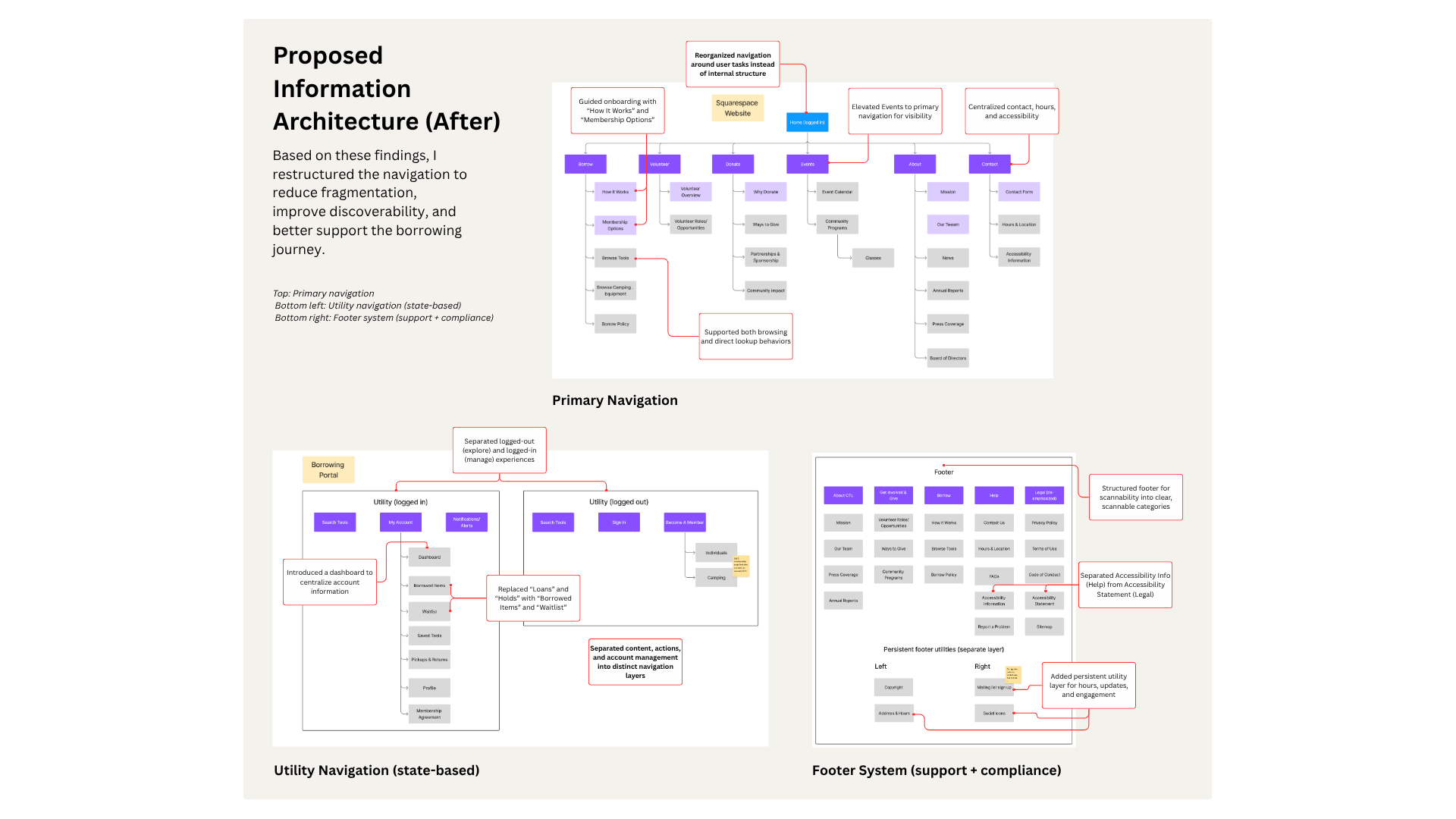
Introduced a “Borrow” navigation category
To better align with user goals, I grouped related actions such as tool inventory, account access, and borrowing policies under a single “Borrow” category. This reduces cognitive load and helps users more easily identify where to begin.
Unified navigation across systems
The website and portal previously used different structures and terminology. I aligned these to create a more consistent experience and reduce the need for users to re-learn navigation when switching contexts.
Reframed terminology to match user expectations
Terms such as “holds” were replaced with more familiar language like “waitlist” to better match user mental models and reduce confusion during the borrowing process.
Prioritized onboarding clarity on the homepage
I proposed restructuring the homepage to clearly explain:
what the tool library is
how borrowing works
what is required to get started
This structure groups content based on user intent rather than internal organization.
Outcome
The proposed changes are designed to:
Help first-time users quickly understand how the tool library works
Reduce confusion when transitioning between the website and member portal
Improve navigation clarity and findability of key actions
Support user confidence when exploring borrowing options
Reflection
To further validate these changes, I would conduct usability testing to evaluate whether users can:
Understand how borrowing works within their first visit
Navigate between the website and portal without confusion
Successfully locate and reserve tools
What I learned
This project reinforced the importance of aligning system structure with user mental models, particularly when experiences span multiple platforms.